20 Best Threat Hunting Tools You Can Use Right Away [2026]
Threat hunting often starts with a hunch: a workstation that keeps connecting to an unfamiliar server, or DNS queries to a newly registered lookalike domain. Hunters then turn this hunch into a hypothesis and test it against evidence in endpoint artifacts, event logs, packet captures, and attacker infrastructure.
Automated detection can’t catch every threat, so hunters need tools that let them ask specific questions of that evidence, and run newly published Sigma, YARA, or Suricata rules against logs, files, and captures collected before those rules existed.
EDR, SIEM, and XDR platforms are the hunter’s main tools, but one doesn’t simply deploy such a platform. They need organization-wide rollout and data before you can run a single query, and that takes procurement and many hours of engineering time. This article covers 20 tools that you can use almost right away on the input you already have, such as a suspicious domain, an EVTX file, a PCAP, a memory image, or a malware sample. Some are ready in minutes, others need some setup, but none requires an organization-wide security platform.
What Threat Hunting Tools Are We Discussing?
Let’s start with a definition so that there are no questions as to why a tool landed in this list. Threat hunting tools are programs that help analysts proactively search for malicious activity that existing security controls haven’t flagged. Rather than waiting for an automated alert, hunters proactively investigate questions like:
- Is any workstation beaconing to an unfamiliar server?
- Did this phishing domain’s operator register other domains?
A tool doesn’t need to perform every step of a hunt to be useful. Some tools collect evidence, some search it, some enrich indicators with context, and some decode suspicious content or detonate payloads.
Types of Threat Hunting Tools
The tools in this article fall into four groups:
- External infrastructure and threat intelligence tools: Investigate domains, IP addresses, certificates, and URLs outside the organization’s network, and expand a small set of indicators of compromise (IoCs) into related infrastructure.
- Endpoint and log analysis tools: Collect and query endpoint artifacts, Windows event logs, and memory images to find persistence, suspicious execution, and lateral movement.
- Network analysis tools: Turn packet captures and connection logs into searchable evidence, and detect patterns such as command-and-control (C2) beaconing.
- Malware and artifact analysis tools: Identify, decode, or detonate suspicious files, scripts, and URLs to extract new indicators and hunting leads.
A threat hunter usually relies on tools from several groups. For example, Zeek and RITA can flag a host beaconing to an unknown server, Domain Research Suite can show who registered the destination domain, and Velociraptor can check the host for the process making those connections.
20 Best Threat Hunting Tools
We selected tools that deliver useful results from at least one readily available input (an endpoint, a set of logs, a capture file, a sample, or an indicator) without requiring an organization-wide security platform. That is why products such as CrowdStrike Falcon, Microsoft Sentinel, Splunk Enterprise Security, and every other SIEM, EDR, and XDR aren’t included. Some tools on this list are commercial, but each can be used on its own without being rolled out across the organization.
| Tool | Category | Main hunting use | Free option | Paid pricing |
| WhoisXML API DRS | External intelligence | Historical WHOIS, reverse WHOIS/DNS pivots, domain monitoring | 500 signup credits | From $19/month |
| Shodan | External intelligence | Exposed services and server characterization | Limited free account | $49 one-time; from $69/month |
| Censys | External intelligence | Host and certificate pivots | 100 credits/month | From $79/month |
| urlscan.io | External intelligence | Phishing and malicious website analysis | Free tier with quotas | From $5,000/year |
| GreyNoise | External intelligence | IP context and scanner noise filtering | 50 searches/week | On request |
| VirusTotal | External intelligence | File, URL, domain, and IP reputation lookups | Free for non-commercial use | Google TI from $75K/year |
| Velociraptor | Endpoint and logs | Endpoint artifact collection with VQL | Open source | Free |
| osquery | Endpoint and logs | SQL queries of OS state | Open source | Free |
| Chainsaw | Endpoint and logs | Sigma-based EVTX hunting and search | Open source | Free |
| Hayabusa | Endpoint and logs | EVTX detection timelines | Open source | Free |
| Nextron THOR | Endpoint and logs | Compromise assessment scanning | THOR Lite | On request |
| Volatility 3 | Endpoint and logs | Memory forensics | Source-available | Free |
| Zeek | Network | Network logs from traffic and PCAPs | Open source | Free |
| RITA | Network | C2 beacon detection in Zeek logs | Open source | Free |
| Wireshark | Network | Packet-level investigation | Open source | Free |
| Suricata | Network | Signature-based traffic inspection | Open source | Free |
| YARA-X | Malware analysis | File pattern matching with YARA rules | Open source | Free |
| capa | Malware analysis | Executable capability detection | Open source | Free |
| ANY.RUN | Malware analysis | Interactive malware sandbox | Community (public) | On request |
| CyberChef | Malware analysis | Decoding and data transformation | Open source | Free |
External Infrastructure and Threat Intelligence Tools
These tools investigate infrastructure outside your network. While they can’t tell you whether an internal endpoint is compromised, they help expand an initial indicator and show you an attacker’s domains, servers, and web assets.
1. WhoisXML API Domain Research Suite (DRS)
WhoisXML API’s Domain Research Suite (DRS) is a web-based platform with a set of domain intelligence search and monitoring tools. It combines different tools such as current and historical WHOIS records, reverse WHOIS and reverse DNS lookups, domain and subdomain discovery, and monitoring of domains, registrants, and brand-related registrations.
Threat hunters use it to expand a single malicious domain into related infrastructure, for example, by finding other domains registered with the same email address or hosted on the same IP address. The platform allows you to easily pivot between tools, simplifying investigations.
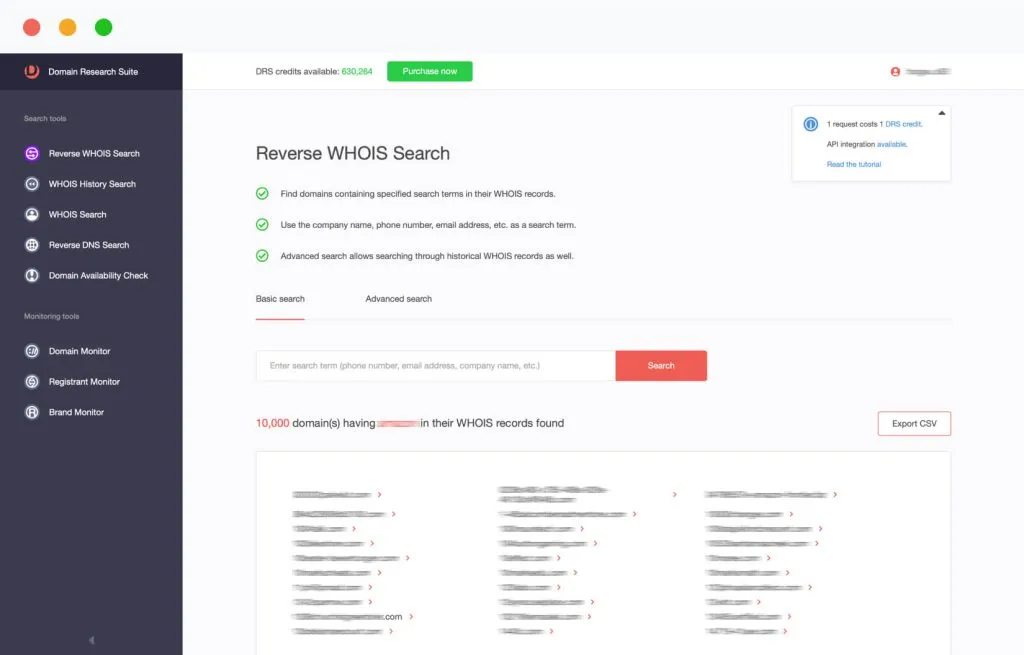
Accepted input: DRS accepts domain names, IP addresses, and WHOIS details such as registrant names, email addresses, and organization names.
Key features:
- Reverse WHOIS Search: Finds domains whose current or historical WHOIS records contain a given registrant name, email address, organization, or other term.
- WHOIS History Search: Shows how a domain’s ownership and registration details changed over time, often allowing you to uncover domain owner emails hidden by domain privacy protection.
- Reverse DNS Search: Identifies domains connected through shared DNS records and IP infrastructure.
- Domains & Subdomains Discovery: Lists domains and subdomains that contain campaign- or brand-specific strings in their hostnames.
- Monitoring: Domain Monitor, Registrant Monitor, and Brand Monitor alert on new registrations and changes relevant to an ongoing hunt.
Pros:
- DRS lets an analyst expand one malicious domain into an entire related infrastructure through WHOIS, historical, and DNS pivots without building API integrations.
- Historical WHOIS data helps when current records are redacted or have changed since the campaign began.
- Monitoring tools keep a hunt running after the initial investigation, for example by flagging newly registered look-alike domains.
- WhoisXML API publishes step-by-step IoC expansion walkthroughs for real campaigns, such as Ducktail and BazarCall, to show how to use DRS for investigations.
Cons:
- Shared hosting, name servers, and registrars can connect unrelated domains, so every pivot needs corroborating evidence before attribution.
- WHOIS privacy and redaction limit what registrant-based searches can return for many domains. Access to WHOIS history helps, but only to an extent.
- Credit consumption varies by operation, so large investigations require planning around the credit balance.
Pricing: You’ll get 500 DRS credits for free when you sign up. Paid options include a $29 one-time purchase of 1,000 credits and monthly subscriptions of $19 (1,000 credits), $79 (5,000 credits), and $149 (10,000 credits). Annual and custom packages are also available.
Alternative: Since many knowledge workers prefer to spend their days talking to AI chatbots, WhoisXML API has released two more threat hunting tool options: Jake AI — a hosted AI internet intelligence assistant that has 25 different WhoisXML API tools at its disposal, and an MCP server if you prefer to connect those tools to your preferred chatbot such as ChatGPT or Claude.
2. Shodan
Shodan is an internet search engine that scans the internet continuously and indexes publicly reachable devices, hosts, and services. It records open ports, service banners, TLS certificates, and other metadata for each host it finds. Threat hunters use it to profile a suspicious IP address from a phishing email or malware sample and find other servers with the same traits, such as a certificate, HTTP response, or favicon hash associated with a C2 framework.
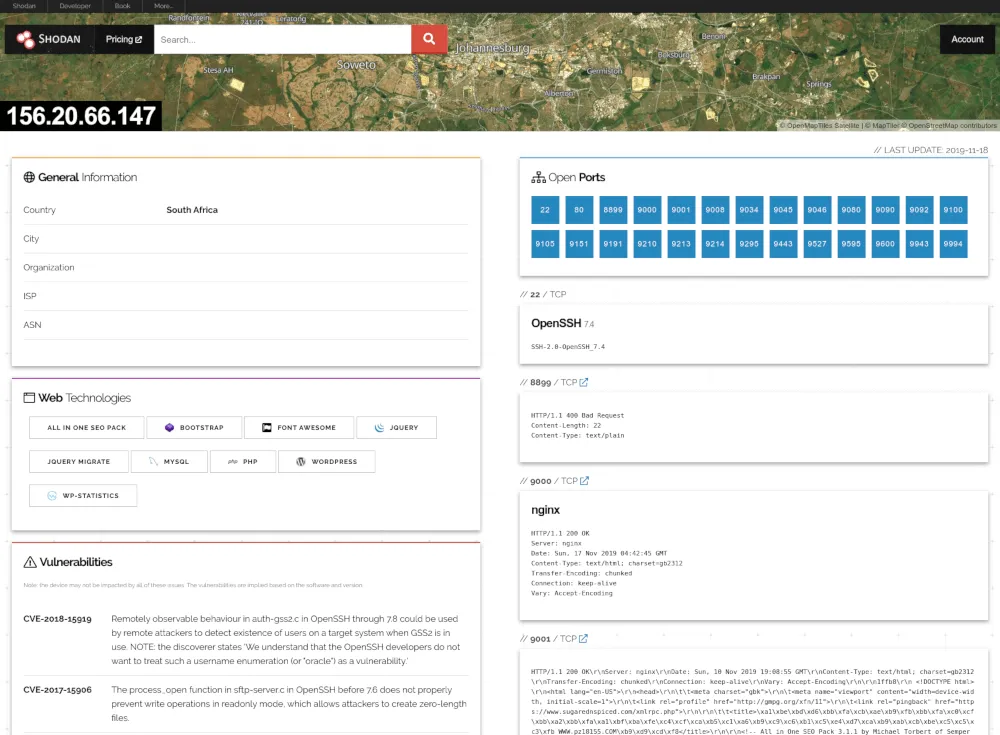
Accepted input: Shodan accepts IP addresses, hostnames, and search queries that use filters such as port, organization, product, and certificate fields.
Key features:
- Host lookup: Shows open ports, service banners, technologies, and known vulnerabilities for an IP address.
- Search filters: Finds hosts matching attributes such as port, product, organization, country, or banner content.
- Monitoring: Shodan Monitor alerts on changes to specified networks and IP ranges.
- API and CLI: Supports scripted lookups and bulk searches.
Pros:
- Helps analysts profile a server linked in a phishing email or malware sample and uncover other servers on the internet with the same configuration.
- Low entry cost, with a one-time membership option for individual analysts.
- Also useful for checking what an organization’s own internet-facing systems expose.
Cons:
- Scan data reflects the time of the last scan and may not match a host’s current state.
- Advanced filters, higher query limits, and commercial-use rights depend on the plan.
Pricing: Shodan offers a free account with limited access. A Membership costs a one-time fee of $49. Monthly subscriptions cost $69 for the Freelancer plan, $359 for the Small Business plan, and $1,099 for the Corporate plan.
3. Censys
Censys is an internet intelligence platform that scans the internet and maintains a searchable dataset of hosts, services, web properties, and TLS certificates. It’s similar to Shodan in many aspects, but it also pulls data from Certificate Transparency logs, so that hunters can find certificates issued for lookalike domains, not just those already seen on live servers. Threat hunters use it to investigate an external IP address or domain and to pivot on technical attributes, such as a certificate fingerprint, service banner, or TLS configuration, to find other servers set up the same way. On paid tiers, its historical data also shows how a host’s services and certificates changed over time.
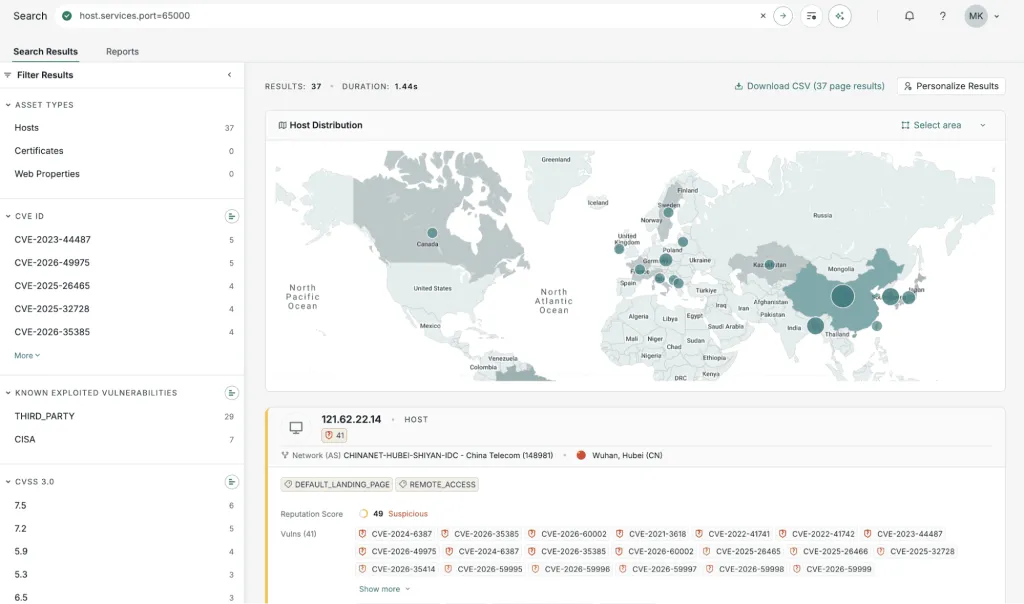
Accepted input: Censys accepts IP addresses, domain names, certificate hashes, and search queries on host, service, and certificate fields.
Key features:
- Host and certificate search: Queries hosts, services, web properties, and certificates with a structured query language.
- Certificate pivots: Finds other hosts presenting the same or related TLS certificates.
- Historical data: On paid tiers, shows how a host’s services and certificates changed over time.
- Result analytics: Aggregates search results by attributes such as location, CVE, and service.
Pros:
- Certificate-centric searches support pivots that complement banner-based search, such as finding servers that share a C2 certificate.
- The free tier allows individual researchers to start without contacting sales.
Cons:
- Every action costs one credit, including viewing a record, loading another page of results, or adding a filter, so the free allowance runs out quickly.
- Investigation-focused features, such as Adversary Investigation, require higher, quote-based tiers.
Pricing: Censys offers 100 free credits per month, plus five free actions per day. Paid Starter subscriptions cost $79/month (500 credits), and Starter Pro costs $599/month (4,000 credits). Pricing for the Core, Adversary Investigation, and higher tiers is available on request.
4. urlscan.io
urlscan.io is a website scanning service that loads a URL in a browser and records the page screenshot, redirects, HTTP requests, loaded resources, domains, and IP addresses. It stores scans in a database, and users can search for past scans.
Threat hunters use it to inspect a suspicious link without visiting it from their own systems, and to search past scans for pages that share a domain, IP address, page title, or resource hash. This helps them find other phishing pages built from the same phishing kit.
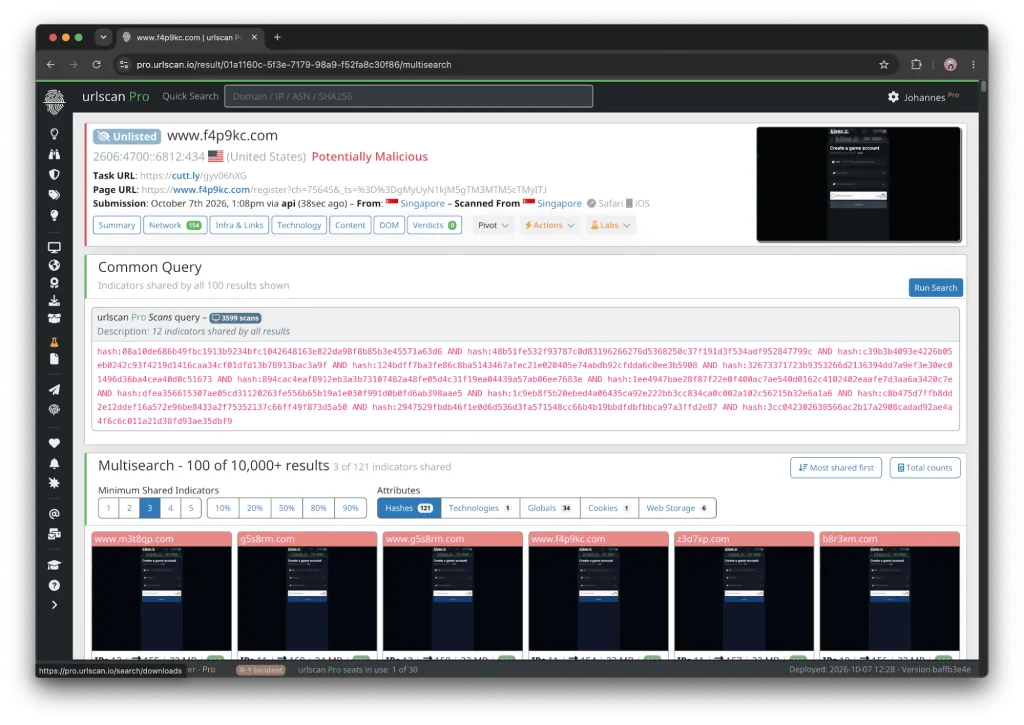
Accepted input: urlscan.io accepts URLs to scan and search queries on domains, IP addresses, hashes, and other page attributes.
Key features:
- URL scanning: Records the full request chain and page content of a submitted URL without the analyst visiting it.
- Scan search: Searches historical scans by domain, IP address, hash, page title, and other attributes.
- Visibility settings: Lets users choose public, unlisted, or private scans.
- Threat hunting features (Pro): Advanced search, saved searches, and subscriptions for ongoing hunts.
Pros:
- Supports a concrete phishing workflow where one suspicious URL leads to its hosting infrastructure and to other sites sharing the same assets or kit.
- Analysts can investigate a site’s behavior without opening it in their own browser.
Cons:
- Public scans are visible to others, so submitting sensitive URLs with the wrong visibility setting can expose investigation details.
- Dedicated threat-hunting capabilities start at the Professional tier, which is priced for teams rather than individuals.
Pricing: There’s a free tier with daily quotas or limits (i.e., 50 private scans, 1,000 unlisted scans, and 5,000 public scans). Paid tiers start at $5,000/year for Automate, $1,250/month ($12,500/year) for Professional, $2,500/month for Enterprise, and $5,000/month for Ultimate.
5. GreyNoise
GreyNoise is a threat intelligence service that collects internet-wide scanning and attack traffic through a network of sensors. It labels IP addresses as benign, malicious, suspicious, or unknown and tags the activity it sees, such as attempts to exploit a specific CVE. Threat hunters use it to triage IP addresses in firewall, VPN, and web server logs, using tags to see which vulnerabilities attackers are exploiting at scale.
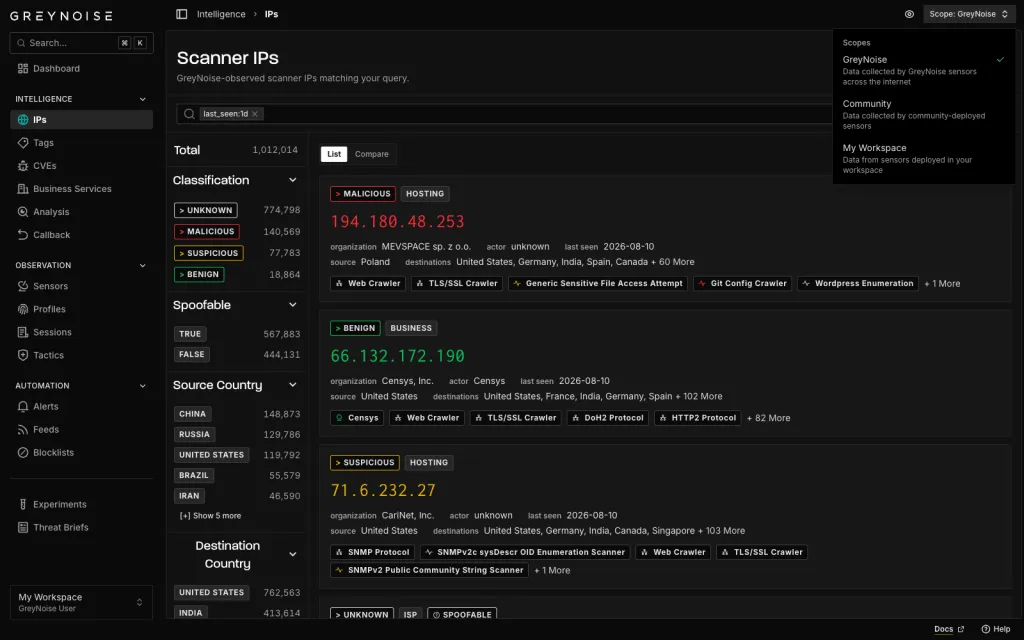
Accepted input: GreyNoise accepts single IP addresses, bulk IP lists, and GreyNoise Query Language (GNQL) searches.
Key features:
- IP context: Classifies an IP address as benign, malicious, suspicious, or unknown, with associated tags, actors, and observed activity.
- Visualizer: A web interface for searching IPs, tags, and CVE-related activity.
- Tags and CVE tracking: Groups observed traffic by behavior and by the vulnerabilities being exploited.
- API and integrations: Enriches alerts in SIEM, SOAR, and threat intelligence platforms.
Pros:
- Shows whether GreyNoise’s sensors have seen an IP address mass-scanning the internet, so hunters can set aside that background noise and focus on activity that may be targeted.
- Quick to use for one-off lookups without changes to the organization’s security stack.
Cons:
- Being classified as background noise doesn’t make an IP benign in every context.
- The free tier limits searches to 50 per week and keeps up to 10 days of history. The Advanced (30 days) and Elite (90 days) plans look further back.
Pricing: GreyNoise offers a free plan with up to 50 searches per week. Pricing for the Standard, Advanced, and Elite plans is available on request.
6. VirusTotal
VirusTotal is a free online service that analyzes files, URLs, domains, and IP addresses with more than 70 antivirus scanners and URL/domain blocklisting services. Each report shows detection results, metadata, and related indicators, along with comments and votes from the VirusTotal community. You can use it to check whether a hash, domain, or IP address found during a hunt has already been flagged by others, and to pivot to related files and infrastructure. Its hunting features, such as Livehunt and Retrohunt, are sold separately as part of Google Threat Intelligence.
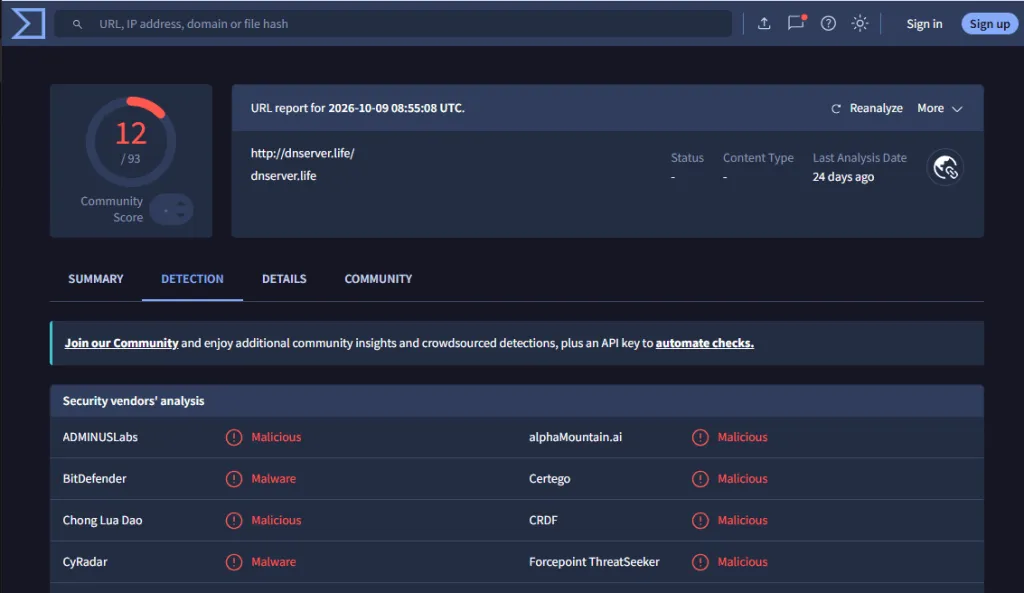
Accepted input: VirusTotal accepts files, file hashes, URLs, domains, and IP addresses. Search queries with modifiers and YARA rules require a paid subscription.
Key features:
- Multi-engine scanning: Checks files and URLs against more than 70 antivirus scanners and URL and domain blocklisting services.
- Indicator reports: Shows detection results and metadata for files, URLs, domains, and IP addresses.
- Community input: Lets users comment on reports and vote on whether content is harmful.
- Relationship graph: Shows connections between files, domains, IP addresses, and URLs.
Pros:
- Gives hunters a quick way to check whether an indicator found in logs or a sample has already been flagged.
- A public API supports scripted lookups of indicators collected during a hunt.
- Relationship data helps uncover campaign infrastructure connected to a known sample.
Cons:
- The free service is for non-commercial use only, and the public API is limited to 500 requests per day at a rate of 4 requests per minute.
- Hunting features such as Livehunt, Retrohunt, and advanced search require a Google Threat Intelligence subscription, which is priced for organizations rather than individuals.
- Files uploaded to the service are shared with security partners and premium customers, so analysts shouldn’t upload internal or sensitive files.
Pricing: VirusTotal is free for non-commercial use, and its public API allows 500 requests per day at a rate of 4 requests per minute. More hunting-specific features come with Google Threat Intelligence, available only on commercial subscriptions, with prices starting at $75,000/year for the Standard tier, which includes 25 Livehunt rules and 5 Retrohunt jobs per month.
Endpoint and Log Analysis Tools
These tools work with evidence from individual systems, such as live endpoints, exported Windows event logs, collected forensic artifacts, and memory images.
7. Velociraptor
Velociraptor is an open-source digital forensics and incident response (DFIR) tool beloved by hunters from all over the world. It collects endpoint artifacts and queries them with the Velociraptor Query Language (VQL), using a library of predefined artifact definitions. Threat hunters use it to run a query across many endpoints simultaneously, for example, to look for a persistence mechanism, a file hash, a suspicious process, or a YARA rule match, and then collect evidence from the hosts that match.
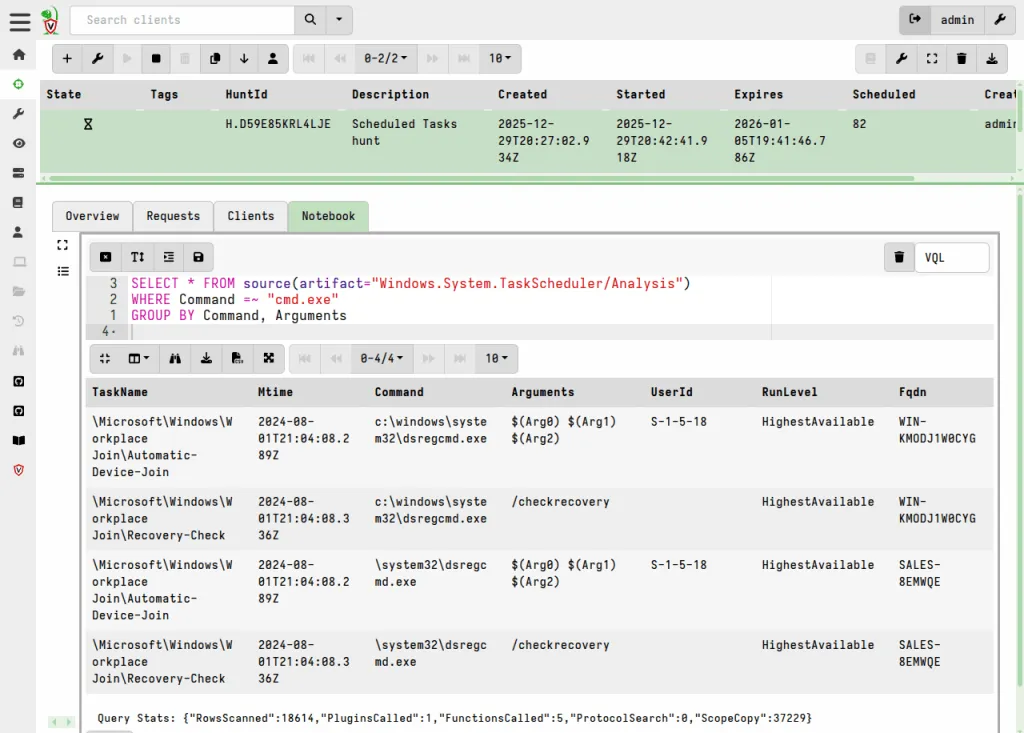
Accepted input: Velociraptor accepts live endpoints running its agent on Windows, macOS, and Linux, and it can also process evidence gathered by its offline collector.
Key features:
- VQL queries: Expresses collections and searches as repeatable queries.
- Artifact library: Provides ready-made collectors for persistence locations, event logs, scheduled tasks, prefetch, and other artifacts.
- Hunts: Run the same collection across many endpoints and aggregate the results in notebooks.
- Offline collectors: Packages collections into a standalone executable for systems without a deployed client.
Pros:
- Can be used for a single targeted investigation and scaled to a fleet later, without buying an EDR platform.
- Hunting hypotheses become reusable VQL artifacts that the team can rerun.
Cons:
- Requires initial server and client configuration, so it isn’t as quick to start as a portable command-line tool.
- Writing custom artifacts requires learning VQL.
Pricing: Velociraptor is free and open source, and like the other open source tools on this list, you need to account for hosting, storage, and staff time.
8. osquery
osquery is an open-source tool that exposes operating system information as SQL tables. Analysts query processes, network connections, users, startup items, and other system state on Windows, macOS, and Linux using SQL. Threat hunters use it to test hypotheses on live hosts, such as by listing processes running from temporary folders or finding unexpected listening ports. When paired with a fleet manager, it can run the same query across many endpoints on a schedule.
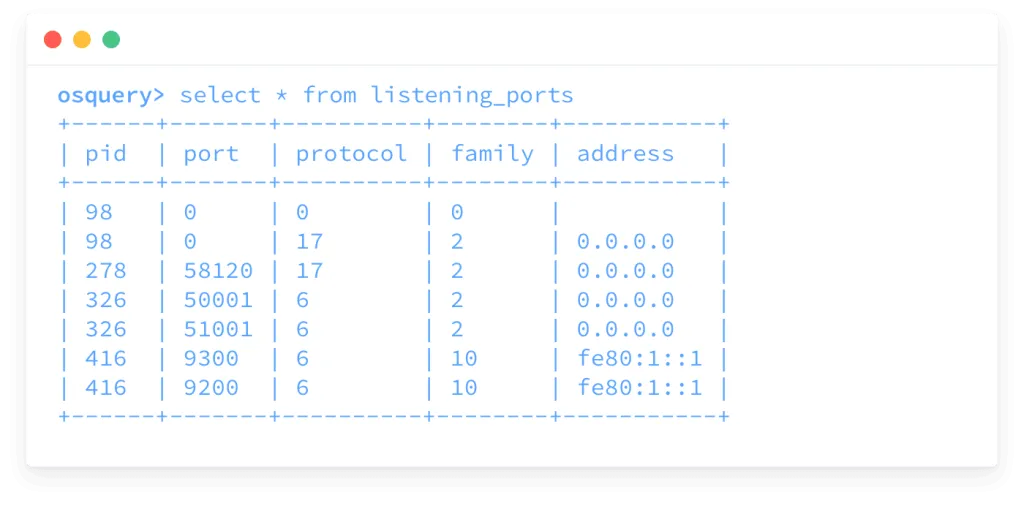
Accepted input: osquery’s input is the live state of the system it runs on, so it doesn’t analyze offline evidence such as disk images or exported logs.
Key features:
- SQL interface: Queries hundreds of tables describing processes, listening ports, installed software, users, and more.
- Interactive shell: osqueryi runs ad hoc queries on a single host without any management infrastructure.
- Scheduled queries: The osqueryd daemon runs queries on a schedule and logs changes.
- Cross-platform support: Uses the same query language on Windows, macOS, and Linux.
Pros:
- Lets you test a hypothesis, such as “a process is running from a temp directory with an outbound connection,” with a single query instead of several manual checks.
- If you already know SQL, you can start without learning a new query language.
Cons:
- Shows current system state, not historical telemetry, unless scheduled queries were already collecting the relevant data.
- Managing osquery across many hosts requires a separate fleet manager.
Pricing: osquery is free and open source.
9. Chainsaw
Chainsaw is an open-source command-line tool from WithSecure Labs for searching and hunting through Windows forensic artifacts. It applies Sigma rules and built-in detection logic to exported EVTX files and supports other artifacts such as Shimcache, Amcache, and SRUM. Threat hunters use it to triage exported event logs, flagging suspicious logins, service installations, and cleared logs. You can also use it to search for specific indicators using keywords or regular expressions.
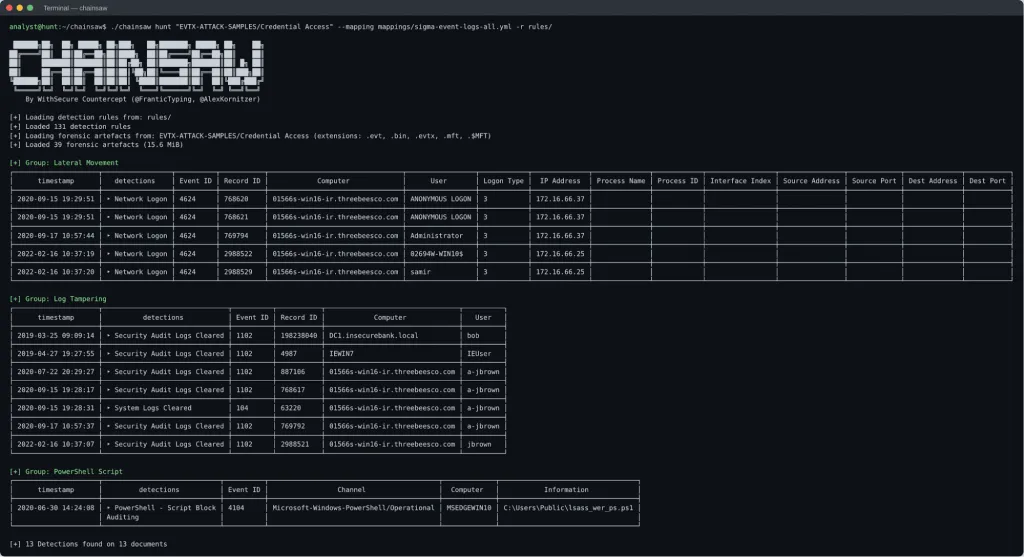
Accepted input: Chainsaw accepts EVTX files and other Windows artifacts, including the MFT, Shimcache and Amcache data, and the SRUM database.
Key features:
- Hunt mode: Applies Sigma rules and Chainsaw’s own detection rules to event logs and groups the results by detection type.
- Search mode: Searches event logs by keyword, regular expression, or Tau expression.
- Additional artifacts: Builds execution timelines from Shimcache data enriched with Amcache, analyzes the SRUM database, and dumps the raw content of the MFT, registry hives, and ESE databases.
- Output formats: Prints tables to the terminal or writes CSV and JSON output.
Pros:
- Runs as a portable binary, with no installation, on a folder of collected logs, so analysis can start without importing data into a SIEM.
- Uses community Sigma rules, so analysts don’t have to write every detection themselves.
Cons:
- Results depend on which logs the source system recorded and on the quality of the rules and field mappings.
- Command-line only, with no graphical interface for browsing results.
Pricing: Chainsaw is free and open source under the GPL-3.0 license.
10. Hayabusa
Hayabusa is an open-source Windows event log analyzer developed by Yamato Security. It’s similar to Chainsaw which we’ve discussed above. It applies Sigma-based and custom detection rules to EVTX files and produces timelines of suspicious events for investigation. You can use it to build a timeline from a host’s event logs, review alerts by severity, and trace activity such as lateral movement, privilege escalation, and suspicious PowerShell use and then load its output into other tools such as Timeline Explorer or Timesketch for further analysis.
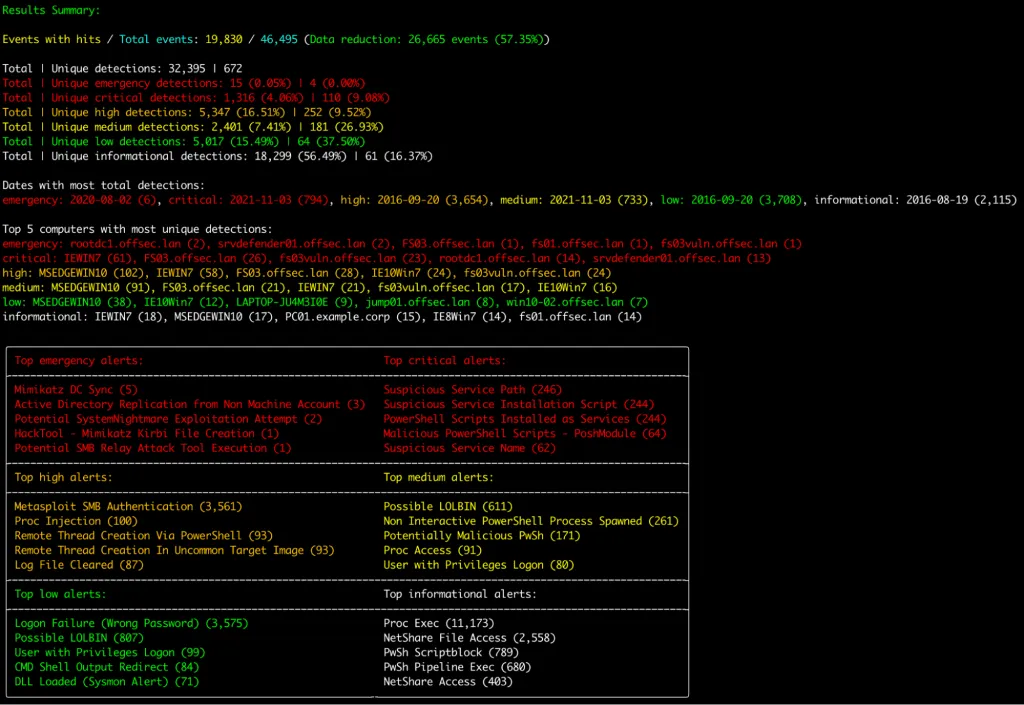
Accepted input: Hayabusa accepts EVTX files, either as exported files and folders or directly from a live Windows system.
Key features:
- Detection timelines: Generates chronological CSV or JSONL timelines of rule matches across one or more systems.
- Results summary: Hayabusa reports detection counts by severity, top alerts, and the most affected computers.
- Rule collection: Ships with a maintained set of Hayabusa and Sigma rules.
Pros:
- Gives a fast overview of where to start when an analyst knows something is wrong but not which behavior to investigate first.
- Timeline output is easy to import into tools such as Timesketch and Elastic for further correlation.
Cons:
- Detections are leads rather than proof of compromise and need manual validation.
- Analyzes only Windows event logs, so it can’t help with Linux or macOS systems.
Pricing: Hayabusa is free and open source under the AGPL-3.0 license. Its bundled detection rules may have separate license terms.
11. Nextron THOR
THOR is a commercial compromise assessment scanner from Nextron Systems. It scans systems for attacker tools, malware, persistence mechanisms, and other suspicious artifacts using YARA rules, Sigma rules, IoCs, and additional detection modules.
Threat hunters use it to check whether systems have been compromised, often running it across many hosts during an assessment, and add their own IoCs and YARA rules to look for a specific threat.
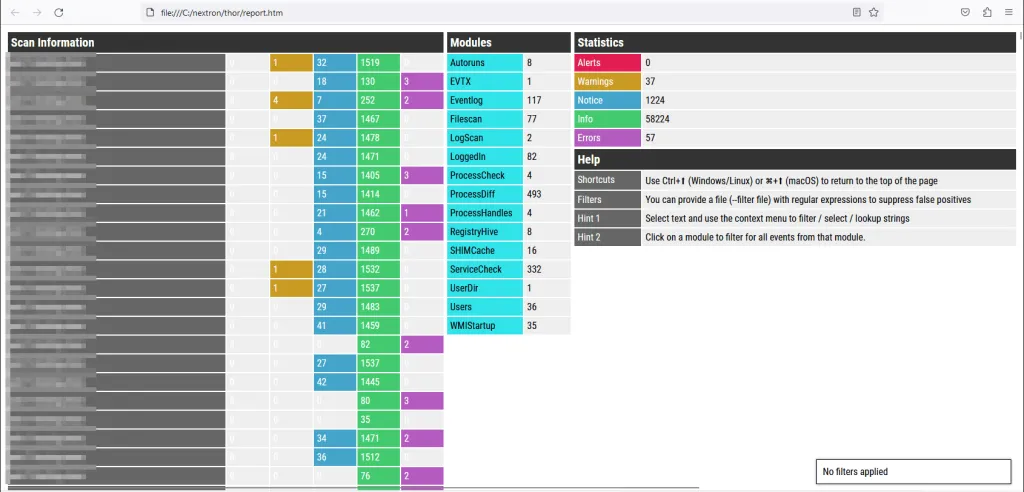
Accepted input: THOR accepts live Windows, Linux, and macOS systems and scans the file system, running processes, registry, and event logs. Some licenses also allow scanning of mounted disk images and collected evidence.
Key features:
- Multi-method scanning: Combines YARA, Sigma, filename, hash, and C2 IoC checks across the file system, memory, registry, and event logs.
- Signature set: Includes Nextron’s maintained detection signatures, with support for custom IoCs and rules.
- Standalone operation: Runs as a scanner on individual systems without requiring Nextron’s management platform.
- Reports: Writes scan results as text or JSON logs, which THOR Util can turn into an HTML report.
Pros:
- Replaces the work of assembling and maintaining multiple separate scanners and rule sets.
- Suits targeted checks of potentially affected systems after a new threat report is published.
Cons:
- Signature-based detection can’t guarantee coverage of novel techniques.
- No published pricing, and the free THOR Lite edition offers a limited feature and signature set.
Pricing: THOR Lite is available for free with limited functionality. Commercial licenses for the full version of THOR are quote-based.
12. Volatility 3
Volatility 3 is a memory forensics framework maintained by the Volatility Foundation. It extracts and analyzes processes, network artifacts, loaded modules, and memory regions from captured RAM images of Windows, Linux, and macOS systems. Threat hunters use it when they suspect malware is running only in memory. In this case, Volatility 3 can, for example, help find injected code, hidden processes, or network connections that leave no trace on disk.
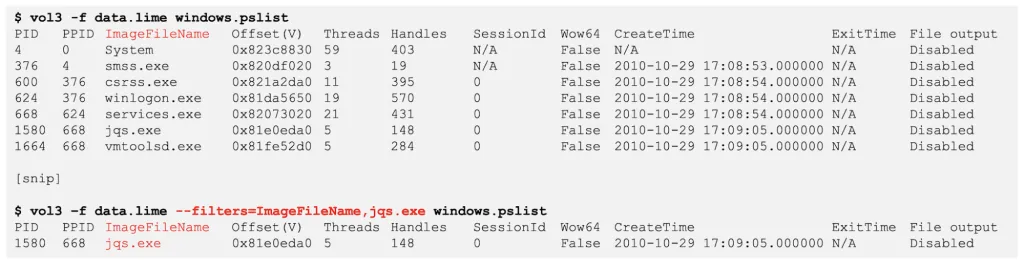
Accepted input: Volatility 3 accepts memory images from Windows, Linux, and macOS systems, including raw memory dumps, Windows crash dumps, LiME captures, and VMware snapshot files.
Key features:
- Process analysis: Lists processes and their relationships, including processes hidden from standard listings.
- Injection detection: The malfind plugin flags suspicious memory regions that may contain injected code, and vadinfo lists a process’s memory ranges for closer inspection.
- Network and module artifacts: Recovers network connections and loaded DLLs and drivers.
- Filtering and output: Filters plugin output by column values and exports results in multiple formats.
Pros:
- Covers evidence that exists only in memory, such as fileless malware and injected code, which disk-based tools miss.
- A large plugin ecosystem supports focused questions about a single memory image.
Cons:
- Doesn’t capture RAM itself, so a separate acquisition tool is needed.
- Reliable analysis depends on having suitable symbol tables for the target operating system.
Pricing: Volatility 3 is free to use under the Volatility Software License, a custom source-available license.
Network Analysis Tools
These tools work with packet captures and network logs and can analyze existing PCAP files, so you don’t need a permanently deployed sensor for an offline investigation.
13. Zeek
Zeek is an open-source network analysis framework that converts network traffic into structured logs of connections, DNS queries, HTTP requests, TLS sessions, files, and other potocol activity. Threat hunters search these logs for signs of compromise, such as rare user agents, unusual DNS queries, long connections, or self-signed TLS certificates. If you retain Zeek logs, their small size compared with full packet captures lets hunters search weeks or months of network activity.
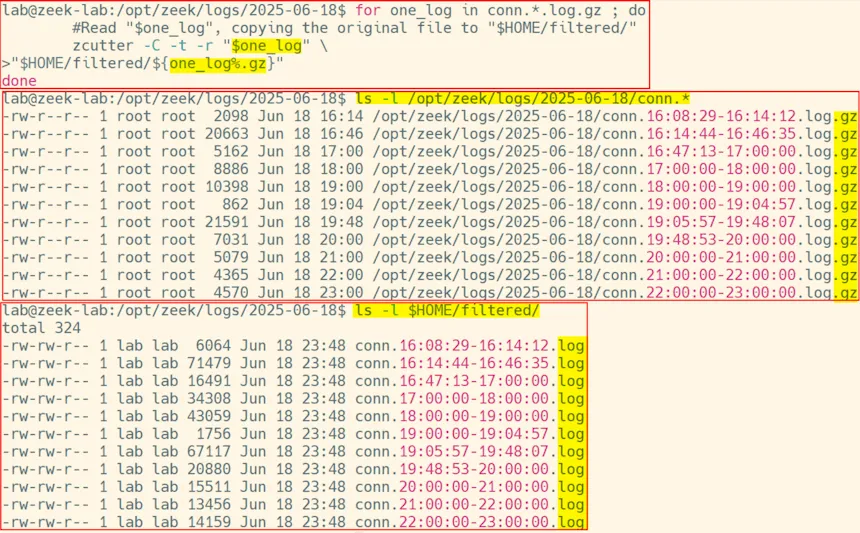
Accepted input: Zeek accepts live traffic from a network tap or SPAN port, as well as PCAP files.
Key features:
- Protocol logs: Writes separate logs, such as conn.log, dns.log, http.log, and ssl.log, for each type of activity.
- PCAP processing: Processes existing capture files as well as live traffic.
- Scripting language: Supports custom analysis and detection logic through Zeek scripts.
- Ecosystem integration: Its logs serve as input for tools such as RITA and for SIEM platforms.
Pros:
- Turns raw packets into searchable records of which systems communicated, what they queried, and which protocols they used.
- Logs are compact compared with full packet captures, which makes longer retention practical.
Cons:
- Produces telemetry rather than verdicts, so analysts still need to decide which connections are malicious.
- Continuous deployment requires capture infrastructure, compute, and storage.
Pricing: Zeek is free and open source under the BSD license.
14. Real Intelligence Threat Analytics (RITA)
RITA is an open-source tool from Active Countermeasures that analyzes Zeek logs to identify suspicious network communication patterns, such as command-and-control (C2) activities. Threat hunters use it to score connections for beaconing, find long connections, and spot possible DNS tunneling, then check the top results against threat intelligence and endpoint data.
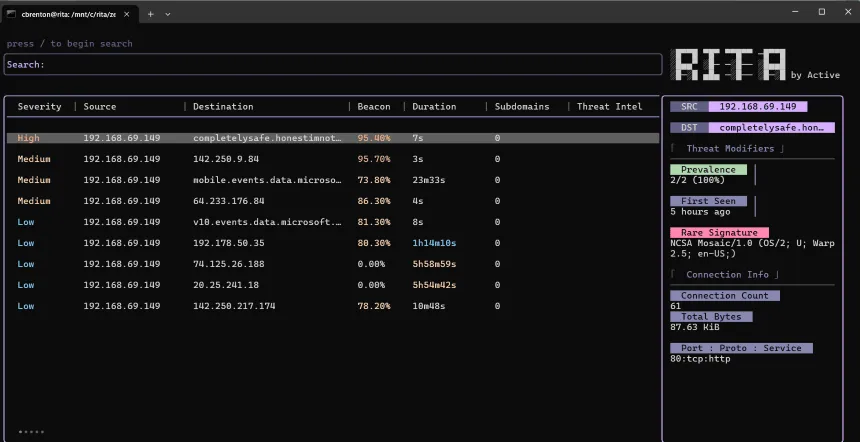
Accepted input: RITA accepts Zeek logs, so teams usually run Zeek on their traffic or PCAP files first.
Key features:
- Beacon detection: Scores connections by the regularity of their timing and data sizes.
- Long connection detection: Flags unusually long-lived sessions.
- DNS tunneling indicators: Identifies domains with an unusually high number of subdomains.
- Threat intelligence matching: Checks destinations against threat intelligence feeds.
- Terminal interface: Displays scored findings in a searchable terminal UI.
Pros:
- Automates the calculation of how regularly each internal host communicates with each external destination, which is impractical to do by hand.
- Purpose-built for a common hunting question, so findings point directly to hosts worth investigating.
Cons:
- Requires Zeek logs and a Docker Engine/Compose environment.
- Legitimate software such as update services and management agents can produce beacon-like patterns that need to be ruled out.
Pricing: RITA is free and open source under the GPL-3.0 license. Active Countermeasures also sells a separate commercial product called AC-Hunter.
15. Wireshark
Wireshark is a free, open-source packet analyzer for capturing and inspecting network traffic at the protocol and packet level. Threat hunters use it to confirm leads from other tools, for example by following a TCP or HTTP stream flagged by Zeek or RITA, reviewing a TLS handshake, or exporting files transferred during a session. Its display filters let analysts isolate specific hosts, ports, or protocols.
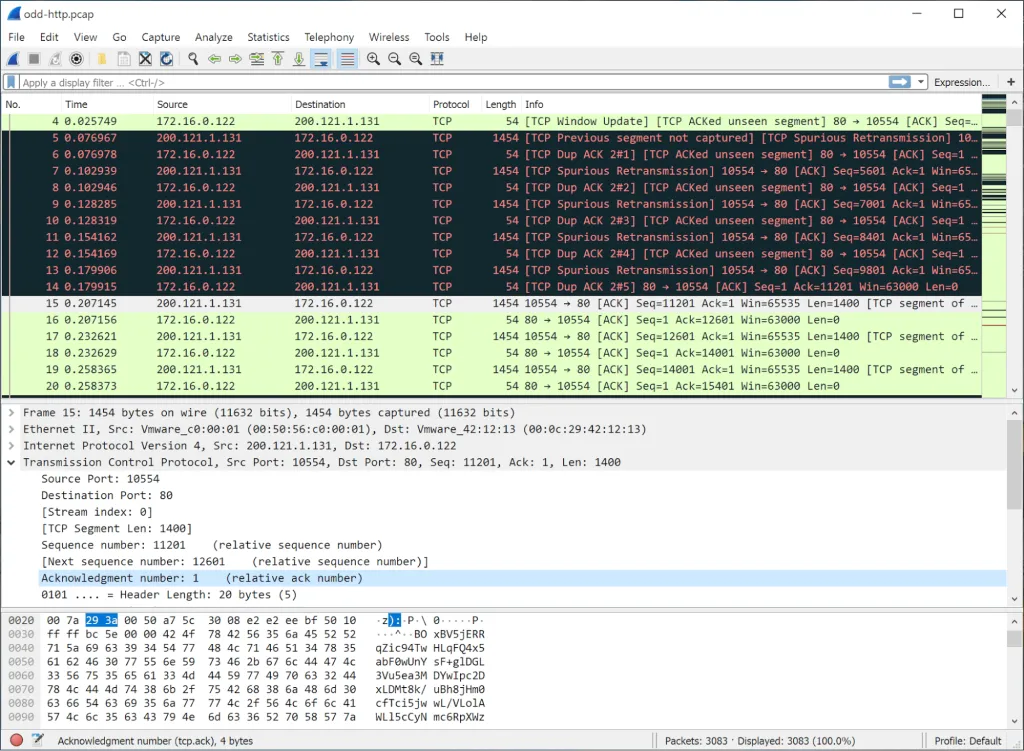
Accepted input: Wireshark accepts live traffic from a network interface and capture files in PCAP, PCAPNG, and many other formats.
Key features:
- Protocol dissectors: Decodes hundreds of network protocols.
- Display filters: Narrows large captures to specific hosts, protocols, or field values.
- Stream reconstruction: Follows TCP, UDP, HTTP, and TLS streams to show full conversations.
- Statistics and export: Summarizes conversations and endpoints, and exports transferred objects.
Pros:
- Lets analysts confirm what happened in a suspicious conversation found by RITA, Zeek, or Suricata.
- Runs on Windows, macOS, and Linux with no infrastructure requirements.
Cons:
- Payload visibility in encrypted traffic is limited without decryption keys.
- Wireshark is hard for beginners: its interface and the sheer volume of packet data make captures slow to navigate and analyze without prior training.
- The analysis gets slow on large captures. So, Wireshark works best after other tools have narrowed the scope.
Pricing: Wireshark is free and open source under the GPL-2.0-or-later license.
16. Suricata
Suricata is an open-source network threat detection engine developed by the Open Information Security Foundation (OISF). It inspects traffic with signature rules and protocol analysis and records alerts and protocol metadata in EVE JSON format. Threat hunters use it in two ways:
- They run older PCAPs against new or custom rules to check whether a newly reported threat was already present.
- They search its protocol logs for DNS, HTTP, and TLS activity that wasn’t flagged by any rule.
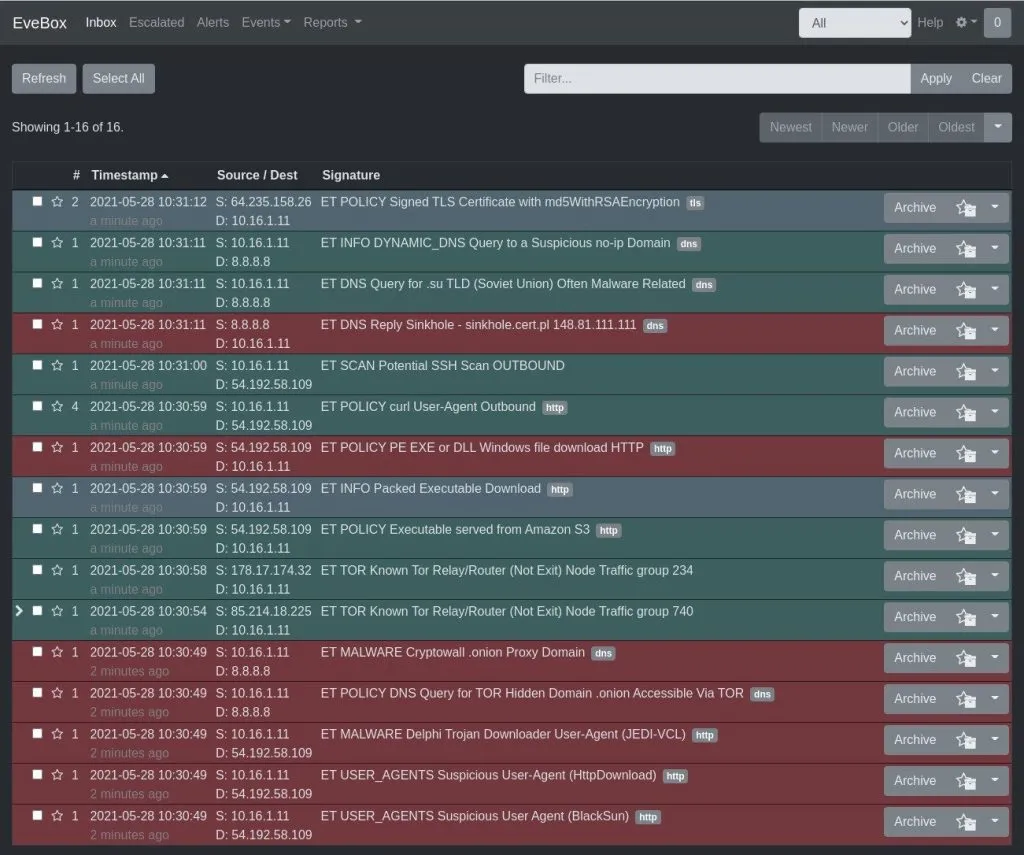
Accepted input: Suricata accepts live traffic, either as an IDS or inline as an IPS, and PCAP files for offline analysis.
Key features:
- Rule-based detection: Applies Suricata and Snort-compatible signatures, including community and commercial rule sets.
- Offline PCAP analysis: Runs rules against existing capture files.
- EVE JSON output: Logs alerts, flows, DNS, HTTP, TLS, and file metadata in a structured format.
- File extraction: Identifies and extracts files transferred over supported protocols.
Pros:
- Lets analysts apply newly published network signatures to captured traffic during an ad hoc hunt.
- A flow ID links an alert to other records from the same network flow, such as HTTP, TLS, and file metadata, providing additional context for the investigation.
Cons:
- Signature matches need validation, and activity that doesn’t match a rule won’t trigger an alert, even though it may still appear in protocol logs.
- Rule-based inspection of encrypted traffic is limited to metadata.
Pricing: Suricata is free and open source under the GPL-2.0 license. Third parties offer commercial support and rule sets.
Malware and Artifact Analysis Tools
These tools analyze suspicious files, scripts, and URLs and convert the results into indicators that can be searched for in endpoint, DNS, proxy, and network data.
17. YARA-X
YARA-X is a Rust-based rewrite of the YARA pattern-matching engine, developed by VirusTotal. It scans files for text strings, byte patterns, and other conditions defined in YARA rules. Threat hunters write rules that describe a malware family or attacker tool, then scan collected samples, file shares, or triage collections for matches.
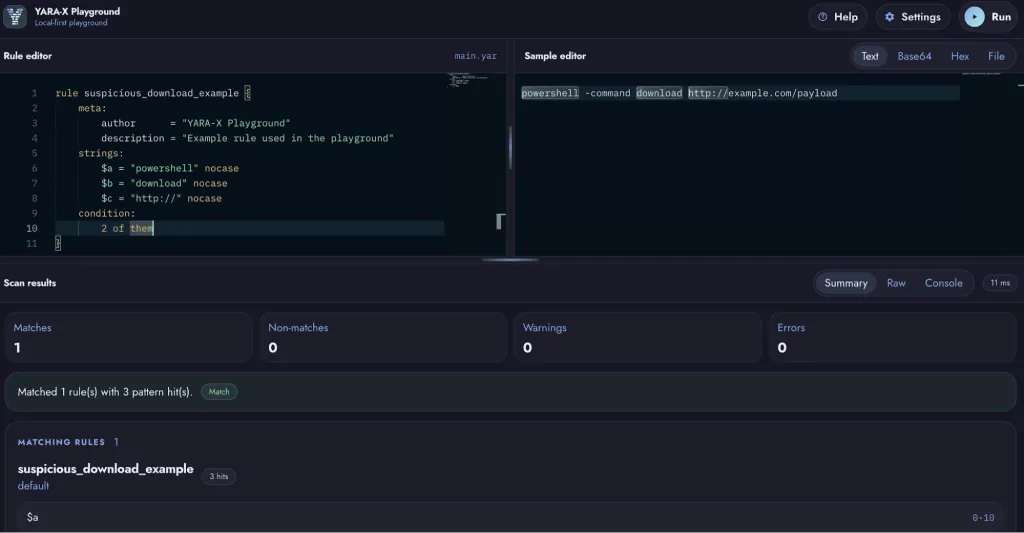
Accepted input: YARA-X accepts files and directories to scan, along with rules written in YARA syntax, which is mostly compatible with rules written for the original YARA.
Key features:
- YARA rule matching: Identifies files that match strings, byte patterns, and conditions defined in rules.
- File format modules: Parses PE, ELF, Mach-O, LNK, and other formats so rules can reference structural properties.
- Compatibility: Supports most existing YARA rules, with documented differences.
- Tooling: Includes a command-line scanner, a browser-based playground, and a language server for rule editors.
Pros:
- Finds malware variants whose hashes differ but whose content or structure matches a rule.
- Rules developed locally can be reused in VirusTotal Livehunt and Retrohunt.
Cons:
- Scans only the files it is given and provides no endpoint visibility on its own.
- Rule quality determines false positives, so new rules need testing against benign and malicious samples.
Pricing: YARA-X is free and open source.
18. capa
capa is an open-source tool from Mandiant that identifies capabilities in executable files, such as network communication, encryption, credential access, and process injection. It matches a sample against a library of capability rules and maps results to MITRE ATT&CK and the Malware Behavior Catalog.
Threat hunters use it to learn what an unknown sample can do without full reverse engineering, then turn those capabilities into hunting leads, such as searching endpoints for the sample’s persistence method.
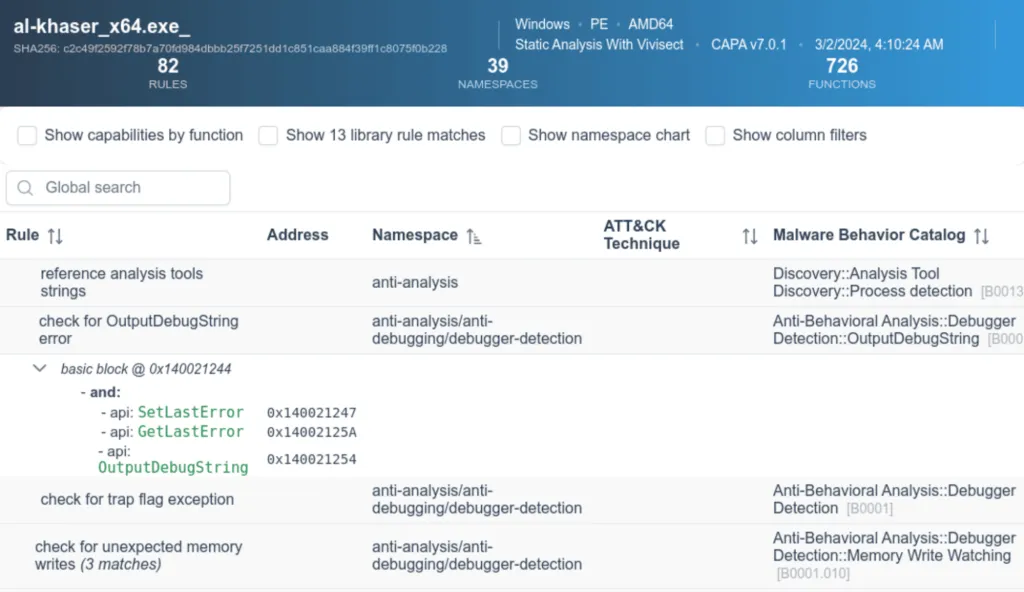
Accepted input: capa accepts Windows PE files, ELF files, .NET modules, and shellcode, and it can also analyze reports from sandboxes such as CAPE.
Key features:
- Capability detection: Reports what a sample can do using static analysis, and matches capabilities against behavior recorded in CAPE, DRAKVUF, or VMRay sandbox reports.
- ATT&CK and MBC mapping: Links capabilities to ATT&CK techniques and Malware Behavior Catalog objectives.
- Rule library: Uses a community-maintained set of capability rules.
- capa Explorer Web: Displays results in a browser, along with the code addresses that triggered each rule.
Pros:
- Gives analysts with little or no reverse-engineering experience a quick summary of what an unfamiliar executable is designed to do.
- Capability results translate into hunting hypotheses, such as searching for hosts that show the same process or network behavior.
Cons:
- With static analysis, results indicate possible capabilities, but not behaviors that are actually executed.
- Packed or heavily obfuscated samples can produce incomplete results.
Pricing: capa is free and open source.
19. ANY.RUN
ANY.RUN is a cloud-based interactive malware sandbox. Analysts submit files or URLs, interact with the virtual machine during execution, and observe process activity, network connections, and other behavior in real time.
Threat hunters use it to extract C2 addresses, dropped files, and other indicators from a sample, then search for those indicators in their own logs. They can also search public analyses submitted by other users to find related samples.
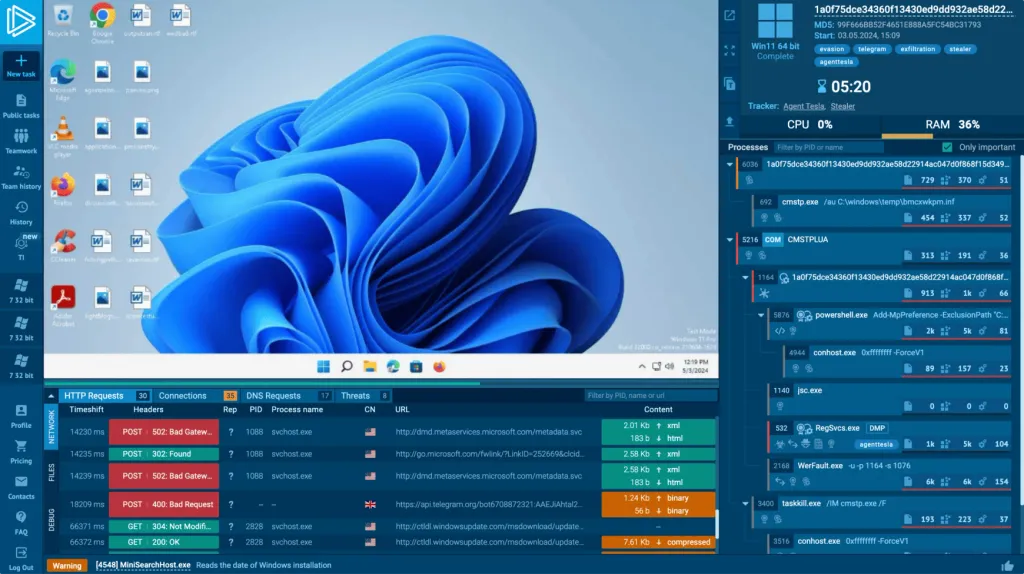
Accepted input: ANY.RUN accepts files, such as executables, documents, scripts, and archives, as well as URLs, and runs them in Windows, Linux, or Android virtual machines.
Key features:
- Interactive analysis: Lets the analyst click, type, and open files inside the running VM to trigger behavior that requires user interaction.
- Process and network monitoring: Records process trees, HTTP requests, connections, and DNS queries.
- IoC extraction: Collects indicators from the analysis for use in other tools.
- Multiple operating systems: Supports Windows, Linux, and Android environments.
Pros:
- Gives direct, browser-based access to dynamic analysis without maintaining an in-house sandbox.
- Interactive control helps with samples that wait for user actions before executing their payload.
Cons:
- Community analyses are public, so sensitive samples require a paid plan with private analysis.
- Sandbox-aware malware may hide its behavior, and a clean run doesn’t prove a sample is safe.
Pricing: ANY.RUN offers a free Community plan for personal use, with a 60-second analysis window and a 16 MB file size limit. The Hunter plan is a paid annual plan for individuals, and its pricing is available on request. Enterprise Suite pricing is custom.
20. CyberChef
CyberChef is a free, open-source web application from GCHQ for decoding, transforming, and analyzing data. Analysts build “recipes” from hundreds of operations, such as Base64 decoding, decompression, and XOR. These recipes can be used to make sense of obfuscated content found during a hunt, for example, decoding a Base64-encoded PowerShell command from an event log or extracting URLs and IP addresses from a script.
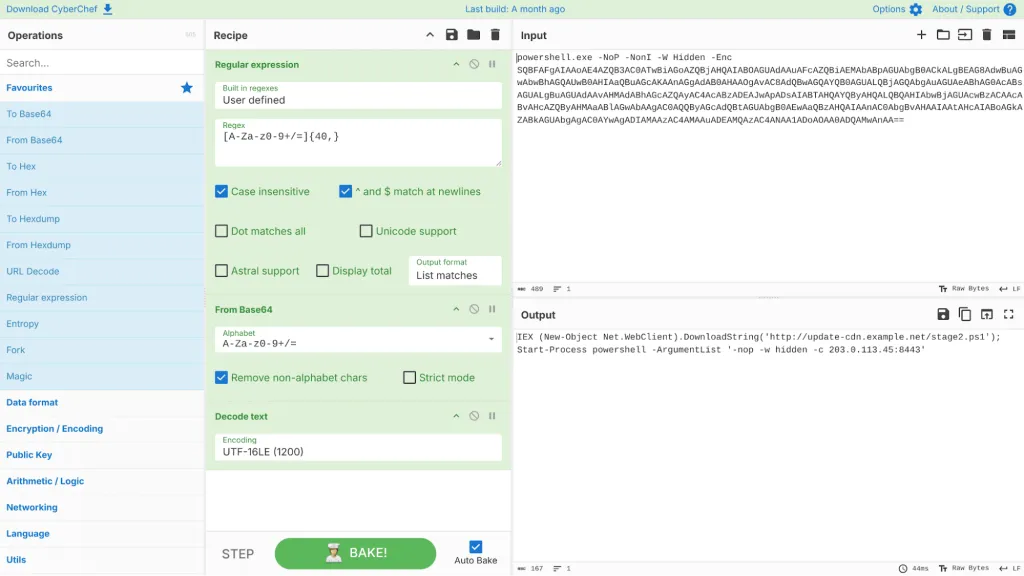
Accepted input: CyberChef runs in the browser and processes data locally. It accepts pasted text, hex, and uploaded files.
Key features:
- Operations library: Provides hundreds of operations for encoding, compression, encryption, parsing, and data extraction.
- Recipes: Chains operations into reusable workflows that can be saved and shared as URLs.
- Indicator extraction: Extracts URLs, domains, IP addresses, and file paths from decoded data.
- Offline use: Runs entirely in the browser, and you can download it to use it without an internet connection.
Pros:
- Reveals infrastructure hidden in obfuscated scripts, such as a download URL inside an encoded PowerShell command, which can then be searched for in DNS and proxy logs.
- The offline version keeps sensitive data on the analyst’s machine.
Cons:
- Doesn’t detect threats by itself; the analyst must know what to decode and which operations to use.
- Complex, multi-stage obfuscation may require custom scripting beyond the available operations.
Pricing: CyberChef is free and open source.
Key Features to Look for in Threat Hunting Tools
It’s hard to define the exact features to look for in every threat hunting tool because of the sheer variety of those tools: YARA-X has pretty much nothing in common with Domain Research Suite, yet both are great and useful tools. It’s just that their use cases are drastically different. Also, some of the tools are one-of-a-kind — there are simply no alternatives.
We tried to come up with at least some parameters that could be applied to the tools. At least those listed below are something you should give some thought to when looking for a tool:
- Supported data sources: The evidence the tool works with, such as EVTX files, live endpoints, memory images, PCAPs, Zeek logs, file samples, or internet-wide datasets. A tool is only useful if it accepts the data you have.
- Query and pivoting capabilities: How easily an analyst can test a hypothesis and move from one indicator to related ones, for example, from a domain to its historical WHOIS records, or from a process to its network connections. How easy it is to export data from one tool so that you can use it with another tool if you need to pivot further.
- Detection content: Whether the tool ships with maintained rules (Sigma, YARA, Suricata signatures, capability rules) and whether analysts can write their own.
- Historical data: Access to past states, such as historical WHOIS and DNS records, earlier scan results, or retrospective file searches. Many hunts depend on what an asset looked like weeks or months ago.
- Deployment effort: Whether the tool runs in a browser, as a portable binary, or requires servers, agents, Docker, or sensors.
- Pricing model: Free and open source, credit-based, subscription, or quote-based, and which hunting features the free tier excludes.
How to Choose the Right Threat Hunting Tool
Below are some tips for choosing a threat hunting tool:
- Start from the data you have. If the investigation begins with exported event logs, Chainsaw or Hayabusa can produce leads within minutes. If it begins with a PCAP, start with Zeek or Wireshark. If all you have is a domain or an IP address from a phishing email or threat report, external intelligence tools such as Domain Research Suite, Shodan, or Censys are great starting points.
- Consider both detection and investigation. Suricata, RITA, Chainsaw, and Hayabusa flag activity that matches rules or statistical patterns. Wireshark, osquery, and Volatility 3 help an analyst examine evidence and confirm or reject a hypothesis. Most hunts need at least one tool of each kind.
- Distinguish internal from external visibility. Endpoint and network tools show what happened on systems you control, while external intelligence tools describe the attacker’s infrastructure but can’t confirm whether a specific internal host is compromised. Indicators found externally need to be searched for in internal telemetry.
- Be realistic about deployment effort. Browser-based services (such as WhoisXML API’s DRS or urlscan.io), CyberChef, Wireshark, and Chainsaw are usable almost immediately. Velociraptor, Zeek, RITA, and Suricata need more preparation, even for offline use.
- Check what the free tier excludes. For VirusTotal, urlscan.io, Censys, and ANY.RUN, the features most relevant to hunting (retrospective YARA search, advanced queries, saved searches and alerts, and private analysis on some services) are in paid tiers. Credit-based services such as WhoisXML API’s Domain Research Suite let you start with a free allowance using all the available functionality and pay as investigations grow.
Conclusion
Since no single tool covers every stage of a hunt, a practical toolkit includes a combination of at least one tool for each evidence type you work with: logs and endpoints, network traffic, suspicious files, and external infrastructure.
For example, a possible C2 investigation might use Zeek to generate logs from a PCAP, RITA to find beaconing, Wireshark to inspect the conversation, Domain Research Suite to research the destination, and osquery or Velociraptor to examine the affected endpoint.
Want to see how far one suspicious domain can take your hunt? Sign up for WhoisXML API’s Domain Research Suite to get 500 free credits and start pivoting on WHOIS and DNS data.
Frequently Asked Questions
What is the difference between a threat hunting tool and an EDR tool?
An EDR platform continuously collects endpoint telemetry and generates alerts. A threat hunting tool helps an analyst search for activity that alerts missed. Some EDR platforms include hunting features, but many hunting tools, such as Chainsaw, osquery, and Volatility 3, work without an EDR deployment.
Can you perform threat hunting without a SIEM?
Yes. Chainsaw and Hayabusa analyze exported Windows event logs directly. Zeek turns network captures into logs, and RITA analyzes those logs. Velociraptor and osquery query endpoints. A SIEM makes it easier to search across many sources at once, but it isn’t required for focused hunts.
Which free threat hunting tools are best for beginners?
CyberChef, Wireshark, and the free tiers of Shodan, urlscan.io, and WhoisXML API DRS have low or no setup requirements. Chainsaw and Hayabusa are good starting points for Windows event log hunting, since both are portable command-line tools that run without installation on a folder of EVTX files.
Which tools can help detect command-and-control beaconing?
RITA is designed specifically to score beaconing behavior in Zeek logs. Suricata can detect known C2 traffic with signatures, and Wireshark helps confirm the behavior at the packet level. External tools such as GreyNoise, Censys, and DRS help characterize the destination infrastructure.
Are free malware sandboxes safe for confidential samples?
Not always. Free tiers of services such as ANY.RUN make analyses public, which can expose sensitive files, URLs, and investigation details. Use a paid plan with private analysis, or an on-premises sandbox, for confidential samples.